I Wrote a Container Runtime From Scratch to Find Out What a Container Even Is
2023-12-05 · 11 min read
For the longest time “container” lived in my head as a magic word. You type docker run alpine, a tiny Linux appears out of nowhere, and you just accept it, the way you accept that the fridge light turns off when you close the door. At some point I got tired of not knowing. So I wrote my own little runtime in Go, called dockerium, for three reasons: I wanted to get better at Go, I wanted to see the container trick with my own eyes, and I wanted to understand why Docker itself is written in Go in the first place. That last one turned out to have the most interesting answer.
Here’s the spoiler that ruined the magic in the best way: a container is not a thing. It’s just a normal process that has been lied to about what it can see. That’s it. No tiny VM, no special “container” object in the kernel. Just a process with a very sheltered upbringing. Let me show you the actual code that does the lying.
The one sentence version
A container is a regular Linux process where you’ve flipped a few switches so it thinks it’s alone in the world:
- Its own filesystem (it can’t see yours).
- Its own process list (it thinks it’s PID 1, the first process).
- Its own hostname, network, users.
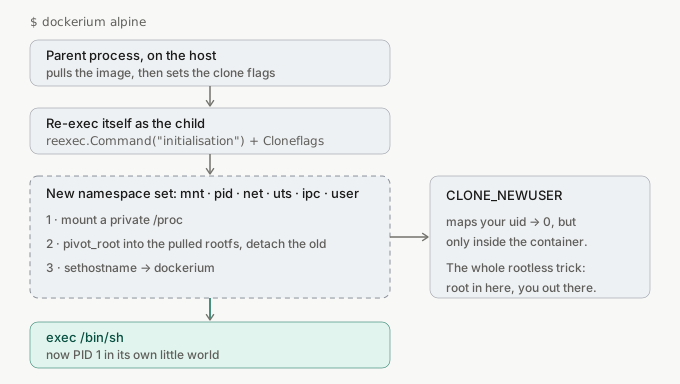
Those switches are namespaces, and the kernel hands them to you for free. dockerium’s whole job is to start a process with the right switches flipped, then drop it into a filesystem we downloaded from Docker Hub. Here’s the shape of it:
Flipping the switches
This is the beating heart of the whole project, and it’s shorter than you’d think. When we launch the child process, we hand the kernel a pile of CLONE_NEW* flags. Each one says “give this process its own private copy of X.”
cmd.SysProcAttr = &syscall.SysProcAttr{
    Cloneflags: syscall.CLONE_NEWNS | // mount namespace: its own filesystem view
        syscall.CLONE_NEWUTS | // its own hostname
        syscall.CLONE_NEWIPC | // its own inter-process comms
        syscall.CLONE_NEWPID | // its own process tree (hello, PID 1)
        syscall.CLONE_NEWNET | // its own network stack
        syscall.CLONE_NEWUSER, // its own user table (this is the rootless bit)
    UidMappings: []syscall.SysProcIDMap{
        {ContainerID: 0, HostID: os.Getuid(), Size: 1},
    },
    GidMappings: []syscall.SysProcIDMap{
        {ContainerID: 0, HostID: os.Getgid(), Size: 1},
    },
}
Read that comment column top to bottom and you have basically read the definition of a container. Six flags. That’s the “magic.”
The last one, CLONE_NEWUSER, is the part I’m proudest of, because it’s what lets the whole thing run without root. The UidMappings block says: “the user that is root (ID 0) inside this namespace is actually just me, my normal unprivileged user, out here.” So inside the container you’re root and can do root-y things, but the kernel still treats you as boring old you on the host. Root in there, not-root out here. That is the entire rootless trick in one struct.
The weird part: the program has to run itself
Here’s the first thing that genuinely surprised me. You’d think you’d just set those flags on your own process and start doing container stuff. You can’t, not cleanly. A Go program is multithreaded from the moment it starts, and some namespaces (PID especially) only really apply to a fresh child. So the classic move, the one every real runtime uses, is: the program re-executes itself. It launches a second copy of its own binary, and that copy is the thing that gets the new namespaces and becomes PID 1.
dockerium does this with Docker’s own reexec helper, and finding it is half the fun of this project. I went digging through the moby/moby source (moby is the open source engine underneath Docker) expecting the “make a container” code to be some huge scary subsystem. Instead, tucked away in pkg/reexec, was this tiny, almost cheeky helper that does exactly the self-re-execution trick. The billion-dollar container company and my weekend toy use the same little function. In init() we register a named entrypoint, and check whether we’re the re-exec’d child:
func init() {
    // register the function that will run *inside* the new namespaces
    reexec.Register("initialisation", initialisation)
    // if we ARE the re-exec'd child, run it and stop here
    if reexec.Init() {
        os.Exit(0)
    }
}
So the same binary plays two roles. First run: “I’m the parent, let me pull the image and spawn a child with the clone flags.” Second run (the child it spawned): “I’m initialisation, I’m inside the fresh namespaces now, let me set up the container.” One program, two personalities, split by a single if.
So why is Docker written in Go?
This was the question I actually built dockerium to answer, and the reexec trick turns out to be the clue. Go is a strange choice for a container runtime if you only look at the good parts. Here’s the honest ledger.
The pros are real and big. Go compiles to a single static binary with no runtime to install, which is exactly what you want for a tool that has to run on every Linux box on earth. It has first-class access to raw Linux syscalls through the syscall package, so clone, pivot_root, mount, and sethostname are all right there. It cross-compiles trivially, and its concurrency model makes juggling many containers pleasant. For a fleet-of-processes tool, that’s a fantastic fit.
But reexec exists because of Go’s one genuine con here, and it’s a sharp one. A Go program is multithreaded the moment it starts (the runtime spins up threads for the scheduler, garbage collector, and so on). Some namespace operations, especially entering a new PID namespace, are defined per-thread or only apply cleanly to a fresh single-threaded process. You cannot reliably just call unshare inside a running Go program and expect a clean container, because you’re not one process, you’re a threaded runtime. So the whole “re-exec yourself as a fresh child with the flags set at spawn time” dance isn’t a cute pattern. It’s a workaround for Go’s threading model, and Docker’s own engineers hit the exact same wall, which is why reexec is sitting in moby’s source in the first place.
Building the container’s fake world
Once we’re the child, inside the new namespaces, we set the place up. The order matters and each line is doing real work:
func initialisation() {
    limitCPUandMemory(rootfsPath, memorylimit, cpulimit) // (see the honest note below)
    mountProc(rootfsPath)                                // give it a private /proc
    defer syscall.Unmount(filepath.Join(rootfsPath, "/proc"), 0)
    pivotRoot(rootfsPath)                                // swap the whole filesystem
    syscall.Sethostname([]byte("dockerium"))             // its own name
    nsRun()                                              // finally, exec /bin/sh
}
The star of this function is pivotRoot. This is how the container gets a filesystem that isn’t yours. You might expect chroot here, the old classic. Real runtimes use pivot_root instead because chroot is escapable and pivot_root actually swaps out the root mount and lets you unmount the old one entirely, so there’s no path back to the host filesystem:
func pivotRoot(newRoot string) error {
    putOld := filepath.Join(newRoot, "/.pivot_root")
    // pivot_root needs newRoot to be a mount point, so bind-mount it to itself
    syscall.Mount(newRoot, newRoot, "", syscall.MS_BIND|syscall.MS_REC, "")
    os.MkdirAll(putOld, 0700)
    syscall.PivotRoot(newRoot, putOld) // new root is live; old root parked at putOld
    os.Chdir("/")
    putOld = "/.pivot_root"
    syscall.Unmount(putOld, syscall.MNT_DETACH) // cut the cord to the host
    os.RemoveAll(putOld)
    return nil
}
Two little gotchas hide in there that cost me real time. One: pivot_root refuses to run unless the new root is a proper mount point, which is why we bind-mount the directory onto itself first. Two: the place you park the old root (putOld) has to live underneath the new root, or the kernel throws EINVAL and you sit there confused. Both are the kind of thing no tutorial mentions until you hit the wall yourself.
Where the image comes from
Before any of that, we need a filesystem to pivot into. That’s just Alpine (or whatever) pulled straight from Docker Hub with its plain HTTP registry API: grab an auth token, fetch the image manifest, download the layer blob, and untar it into a folder. The extraction is refreshingly dumb, it literally shells out to tar:
func ExtractLayer(filepath string) error {
    cmd := exec.Command("tar", "-xvf", filepath, "-C", "/tmp/dockerium/rootfs/")
    return cmd.Run()
}
A Docker image, demystified, is a tarball of a filesystem plus a JSON file describing it. Unpack the tar, and you have a root directory you can pivot into. That’s the whole “image” concept.
The honest part: what I faked
I promised myself I’d be straight about this, because pretending a learning project is production is how you fool exactly one person, yourself. Two things in dockerium look done but aren’t:
The resource limits are theatre. There’s a limitCPUandMemory function that dutifully writes 500MB and some CPU shares into files like memory.limit_in_bytes. Looks legit. It does nothing. It writes those files inside the container’s own rootfs directory, as plain text files the kernel never reads. Real cgroups mean writing into an actually-mounted cgroup hierarchy, and doing it under a user namespace needs delegated permissions on top. So my container will happily eat all your RAM. Lesson burned into me forever: writing a file named memory.limit_in_bytes is not the same as setting a memory limit. The name is not the mechanism.
There’s no networking. I set CLONE_NEWNET, which gives the container its own network stack, which sounds great until you realize a fresh network namespace has nothing in it but a loopback interface. To actually reach the internet you have to build a virtual ethernet pair, wire it to a bridge, set up NAT. dockerium does none of that. So the container is isolated on the network in the most complete way possible: it can talk to no one.
What this actually taught me
The point was never to replace Docker. Docker has a decade of people solving the exact “theatre” problems I just admitted to. The point was to delete the magic. And it worked: I can’t hear “container” anymore without seeing six clone flags and a pivot_root.
If you’ve got a black box in your own stack that you’ve just been accepting, this is my pitch: go build the crappiest possible version of it. Two hundred lines that barely work will teach you more than a hundred blog posts, because the kernel doesn’t accept vibes. It makes you get the flags right.
TL;DR
- A container is a normal process with a few kernel switches flipped: namespaces for filesystem, PID, network, hostname, users. There is no “container” object.
- The program re-execs itself so the child gets a clean set of namespaces and becomes PID 1. One binary, two roles, split by an
if. pivot_root, notchroot, swaps the filesystem and cuts the cord to the host. Mind the two gotchas: new root must be a mount point, old root must live underneath it.CLONE_NEWUSERmapping your uid to 0-inside-only is the whole rootless trick.- Be honest about the theatre. Writing to a file called
memory.limit_in_byteslimits nothing. A fresh net namespace has no network.
Go deeper
- The whole thing is ~440 lines of Go: github.com/Vandit1604/dockerium
- Docker’s own
pkg/reexecin the moby source, the tiny helper this whole thing (and Docker itself) leans on man 2 pivot_rootandman 7 namespaces, the two pages that explain the real machinery- Liz Rice’s “Containers From Scratch” talk, which is the canonical version of this exercise and where a lot of the shape comes from